
Products
Photocopier
Refurbish Copiers
Colour Printer
Large Format Printer / Plotter
Production Printer
Document Scanner
Business Card Scanner
Office Equipment
Hot Stamping
Epson Projectors
Wire O Binding Deli ET322D PJ
Software
Cloud Electronic Document
Capture and Distribution
Printing Media
Fotostat Seri Murni Sdn Bhd | Ricoh Office Solutions

Rent or Buy Ricoh IM C2510 A3 Colour Photocopier in Petaling Jaya

25 ppm professional colour printing. Smarter office workflows. Reliable local service support.

Upgrade your office with the Ricoh IM C2510 A3 Colour Multifunction Printer, designed for productive colour printing, photocopying and document scanning.

Looking for Ricoh IM C2510 rental or purchase in Ara Damansara, Kelana Jaya, Tropicana, Kota Damansara, Glenmarie, Bandar Utama, Petaling Jaya, Puchong, Subang Jaya, Shah Alam or Klang?

Fotostat Seri Murni Sdn Bhd provides office photocopier solutions with flexible rental and purchase quotations, installation, user training and onsite maintenance options.
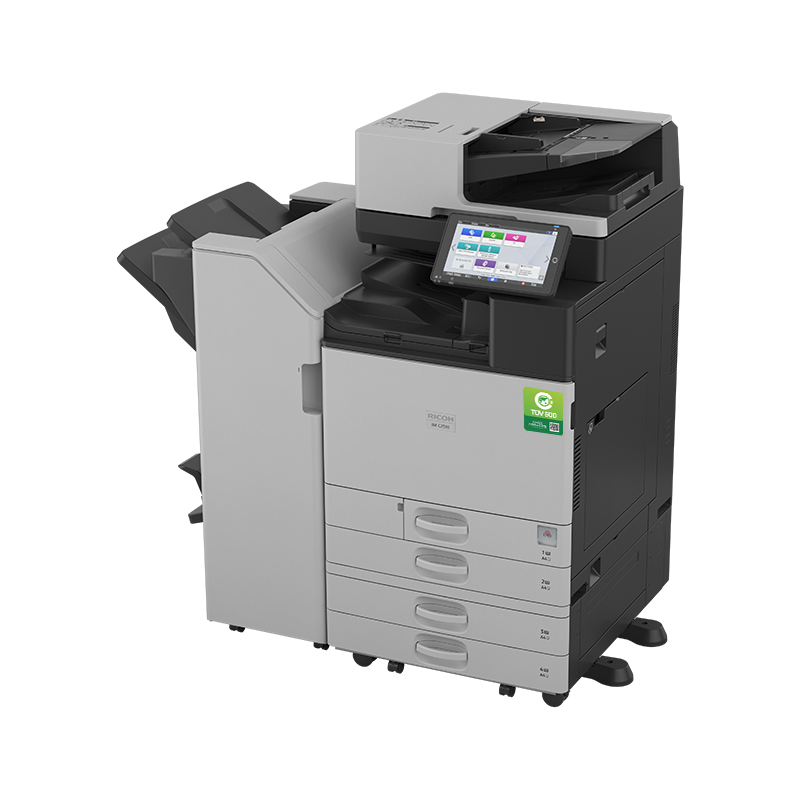
25 ppm Colour & Mono A3 / SRA3 Print • Copy • Scan 10.1" Smart Panel
✓ Established Since 1993 ✓ 6 Branches in Malaysia ✓ Local Sales & Service
Ricoh IM C2510 A3 colour multifunction photocopier with optional finishing accessories
RICOH IM C2510 | A3 COLOUR MFP
25 ppmPrint Speed
SRA3Paper Size
10.1"Smart Panel
01 / Unique Selling Points

Why Choose Ricoh IM C2510? Features, Advantages & Business Benefits

A single multifunction device helps your team create, reproduce and digitise business documents while supporting everyday office productivity.

⚡

25 ppm Colour Productivity

Print business reports, invoices, presentations and internal documents at up to 25 pages per minute in colour or black and white.

🎨

Professional Colour Quality

Produce clear graphics, charts, branded proposals, marketing materials and professional reports using Ricoh colour printing technology.

📐

A3 & SRA3 Paper Capability

Handle large spreadsheets, plans, schedules, technical reference diagrams and selected short-run promotional materials.

📲

10.1-Inch Smart Operation Panel

Use the touchscreen to access everyday copy, print and scan functions with intuitive menus and personalised workflows.

📥

Digital Document Scanning

Scan multi-page documents to email, folders or USB. Optional OCR supports searchable PDF documents for easier filing.

🔄

Automatic Duplex Printing

Print two-sided documents automatically to make professional reports and handouts while reducing unnecessary paper usage.

🔐

Business Security

Supported authentication, encryption and secure output features help organisations manage sensitive office documents.

☁️

Optional Digital Workflow Integration

Explore compatible Ricoh Smart Integration services for selected cloud-based scanning and document workflows. Licensing and configuration may apply.

🌿

More Sustainable Office Printing

Energy-saving design and the use of post-consumer recycled plastics help support environmentally conscious office purchasing decisions.

02 / Technical Product Information

Ricoh IM C2510 Technical Specifications & Printing Capabilities

Check the essential manufacturer specifications before selecting your office photocopier rental or purchase package.

Manufacturer / ModelRicoh IM C2510
Machine TypeA3 / SRA3 Colour Multifunction Printer
FunctionsPrint, Copy, Scan; Optional Fax
Colour Printing Speed25 pages per minute
Black & White Speed25 pages per minute
Print Resolution1200 × 1200 dpi / up to 4800 × 1200 dpi equivalent
Smart Operation Panel10.1-inch Touchscreen
Standard Paper Input1200 Sheets
Maximum Paper Input2300 Sheets
Paper Tray Configuration2 × 550-Sheet Trays + 100-Sheet Bypass
Document Feeder100-Sheet ARDF
ARDF Scan SpeedUp to 80 ppm under specified settings
Automatic DuplexStandard
Memory6 GB Standard
Storage256 GB SSD
Maximum Paper SizeSRA3
Paper Weight52–300 gsm, depending on selected paper path
NetworkingEthernet Standard; Wireless LAN Optional
Scan DestinationsEmail, Network Folder, USB, Supported PDF Formats
Optional SolutionsFax, OCR, Compatible Finishing Accessories and Workflow Software
Mainframe Dimensions587 × 701 × 913 mm
Mainframe WeightApprox. 89.7 kg

Specifications are based on Ricoh Asia Pacific's published IM C2510 product information. Optional accessories and software require separate confirmation. Supported maximum media weight and paper sizes depend on the selected tray and print settings.

View Official Ricoh IM C2510 Product Details ↗

03 / Flexible Commercial Solutions

Ricoh IM C2510 Rental vs Outright Purchase – Which Package Is Better?

We help businesses compare upfront costs, ongoing printing expenses, equipment ownership, servicing and technical requirements.

Option B / Equipment Ownership

Buy Ricoh IM C2510

Suitable for organisations wanting long-term ownership of their office printer.

  • Outright purchase quotation
  • Machine configuration consultation
  • Optional paper handling and finishing accessories
  • Delivery and commissioning options
  • Staff operation training
  • Warranty terms confirmed in writing
  • Optional maintenance and consumables agreement
Request Purchase Price →

All rental prices, deposits, meter charges, consumables, purchase prices, warranty periods and complimentary services are subject to the confirmed written quotation. Machine condition and included accessories will be declared before confirmation.

Need Help Selecting the Right Ricoh Package?

Tell us your estimated monthly printing volume, number of users and office location. Our team can recommend a suitable option.

04 / Customer Challenges

Common Office Printing Problems & How Ricoh IM C2510 Solves Them

Frequent printer breakdowns, slow printing, expensive consumables and inefficient document processing can affect daily office productivity. Fotostat Seri Murni helps you select the right equipment and support package.

Problem: Slow Printing Before Important Deadlines

Staff need to print large reports, customer proposals or tender submissions before meetings and submission deadlines.

FSM Solution: Upgrade to a 25 ppm colour and monochrome multifunction machine for everyday A3/A4 business document production.

Problem: Multiple Printers with Different Toners

Managing several small printers creates inconsistent print quality, toner purchasing and maintenance tasks.

FSM Solution: Consolidate printing, copying and scanning into one shared office device, with optional maintenance and consumables arrangements.

Problem: Unclear Colour Printing Expenses

Offices find it difficult to predict spending on equipment repairs, colour toner and consumable replacements.

FSM Solution: Ask for an itemised rental or purchase quotation with colour and mono meter charges, coverage and exclusions clearly stated.

Problem: Paper Documents Are Difficult to Retrieve

Manually filing invoices, agreements and administrative records makes document retrieval time-consuming.

FSM Solution: Use scan-to-email and scan-to-folder workflows. Optional OCR and compatible software can improve searchable document management.

Problem: A4 Desktop Printers Cannot Print A3

Large spreadsheets, engineering reference drawings and oversized meeting documents may require outside printing.

FSM Solution: Use the IM C2510's A3/SRA3 capability for supported internal business document applications.

Problem: No Reliable Copier Technician

Waiting for outside repair support can cause extended machine downtime and inconvenience for staff.

FSM Solution: Arrange local onsite technical support, maintenance terms and consumables management through an agreed service package.
05 / Specific Target Markets

Who Should Rent or Buy Ricoh IM C2510? Industries & Business Users

The IM C2510 is suited to office workgroups that need professional colour output, everyday copying, scanning and occasional larger-format documents.

🏢

Corporate Offices & SMEs

Proposals, employee documents, company profiles, sales reports and meeting presentations.

🏘️

Condo Management Offices

Residents' circulars, AGM documents, invoices, management reports and committee minutes.

🏗️

Construction & Engineering

A3 reference drawings, tender documents, technical schedules and project reports.

⚖️

Legal & Professional Firms

Client letters, contracts, signed paperwork, secure print and document archiving.

📊

Accounting & Finance

Financial statements, audit reports, schedules, supporting records and administrative forms.

🏫

Schools & Tuition Centres

Worksheets, teaching materials, examination notices, training notes and learning handouts.

🏥

Medical & Healthcare Offices

Administrative reports, appointment forms, office records and authorised document scanning.

🛒

Retail & Distribution

Product lists, promotional materials, stock reports, invoices and internal notices.

06 / Complete Applications

Ricoh IM C2510 Complete Office Printing, Copying & Scanning Applications

Create professional office documents, handle internal printing tasks and convert paper records into digital files with one multifunction machine.

📊

Business Reports

Annual reports, monthly sales figures, graphs, performance charts and business analysis documents.

📑

Tender Submissions

Tender specifications, commercial proposals, supporting documents and submission packs.

🧾

Quotations & Invoices

Sales quotations, payment records, invoices, statements and purchasing paperwork.

📐

A3 Technical Drawings

Reference floor plans, engineering diagrams, construction reports and project schedules.

📈

Spreadsheets & Charts

Budget summaries, stock tables, financial spreadsheets and large colour data tables.

🖼️

Colour Presentations

Marketing proposals, presentation handouts, product comparisons and charts.

📣

Brochures & Flyers

Selected short-run office brochures, announcements, promotional handouts and notices.

📄

Contracts & Agreements

Business agreements, service contracts, correspondence and document copies.

📚

Training Materials

Internal manuals, staff training guides, lesson handouts and procedures.

📥

Document Scanning

Digitise invoices, agreements and records using the automatic document feeder.

☁️

Digital Archiving

Scan to email or network folders. Optional OCR helps prepare searchable digital records.

🔒

Confidential Printing

Use supported authentication and secure printing options for controlled document output.

Important Application Note: The IM C2510 is an office A3 colour multifunction printer, not a dedicated heavy-production printing press or wide-format engineering plotter. Media compatibility, finishing options and software capabilities should be confirmed before purchase.
01 Print

Produce colour reports, tenders, invoices and office documents.

02 Copy

Reproduce multi-page paperwork with automatic document feeding.

03 Scan

Convert paper records into email or digital folder files.

04 Manage

Organise files with supported document workflows and optional software.

07 / Complete FSM Solutions

Ricoh IM C2510 Rental, Purchase & Managed Photocopier Service Packages

Select a package based on your office's print volume, budget, preferred ownership structure and technical support requirements.

Plan B – Buy

Outright Purchase Package

Designed for organisations that prefer to own their office photocopier.

  • Purchase price quotation
  • Machine configuration options
  • Optional paper trays and finishers
  • Installation arrangements
  • Operation and user training
  • Warranty coverage quotation
  • Optional service contract
  • Optional toner and supplies agreement
Plan C – Maintain

Managed MFP Service

Designed for businesses needing technical assistance after installation.

  • Printer network configuration
  • Scan-to-email and folder setup
  • Consumables management
  • Maintenance scheduling options
  • Onsite technician arrangements
  • Printer performance consultation
  • Optional document workflow software
  • Future machine upgrade planning
Free Local Delivery, Installation & User Training: Ask about eligible rental and purchase packages that include these services in Ara Damansara and supported Klang Valley locations. Exact inclusions, floor access, network setup, delivery distance and additional charges will be confirmed in writing.
One Machine. Multiple Business Solutions.

Let our sales consultant recommend the right IM C2510 configuration, optional accessories and commercial package for your organisation.

WhatsApp for Package Recommendation →
08 / Sales Consultation

Fast Ricoh IM C2510 Rental & Purchase Quote Checklist

Provide these details to help our sales consultant recommend a suitable machine configuration, rental package, outright purchase price and service arrangement.

  1. Company Name: Registered business or organisation.
  2. Installation Location: Office address, area and postcode.
  3. Rental or Purchase: Monthly rental, outright purchase or both.
  4. Number of Users: Staff sharing the office printer.
  5. Monthly Black & White Volume: Estimated pages per month.
  6. Monthly Colour Volume: Estimated pages per month.
  7. Document Applications: A4 reports, A3 printing, tenders, contracts, invoices or other work.
  8. Special Requirements: Extra paper trays, optional fax, finishing, OCR or secure printing.
  9. Network Requirements: Ethernet, optional Wi-Fi, scanning and software setup.
  10. Preferred Delivery Date: Installation timeline and access arrangements.

What Your Quotation Should Include

Understand the full equipment and operating costs before committing.

  • Machine condition and specifications
  • Monthly rental or purchase price
  • Rental contract period and deposit
  • Colour and B&W meter rates
  • Toner and consumables coverage
  • Covered spare parts and maintenance
  • Delivery and installation
  • Onsite service warranty terms
09 / Availability & Local Support

Ricoh IM C2510 Ready Stock, Free Local Delivery, Installation, Training & Onsite Warranty

Ask Fotostat Seri Murni to confirm current machine availability, available configurations, expected delivery dates and the service arrangements for your location.

01

Ready Stock Enquiry

Check current Ricoh IM C2510 stock, machine condition, optional accessories and available delivery dates before placing an order.

02

Delivery, Installation & Training

Eligible local packages include free standard delivery, installation and basic user training, subject to confirmed quotation terms and site access.

03

Onsite Service Warranty

Ask about onsite technical assistance, maintenance, covered parts, consumables arrangements and service response commitments in the written agreement.

Nearby Areas We Serve

Our Petaling Jaya sales office accepts enquiries from businesses across the following Klang Valley locations:

Ara Damansara Kelana Jaya Tropicana Kota Damansara Glenmarie Sungai Buloh Bandar Utama Petaling Jaya Puchong Subang Jaya Shah Alam Klang Kuala Lumpur

Whether your office is near Paradigm Mall Kelana Jaya, Tropicana, Kota Damansara, Bandar Utama, Glenmarie, Subang Jaya, Shah Alam or Klang, contact our Ara Damansara office for a quotation and local service coverage confirmation.

10 / Established Office Equipment Partner

Why Choose Fotostat Seri Murni – And Why Upgrade Your Office Copier Now?

A multifunction photocopier is a long-term workplace investment. Our goal is to help customers select an appropriate machine, understand the running costs and receive the technical support described in their agreement.

🏆

Established Business Heritage

Fotostat Seri Murni represents an established Malaysian office equipment business with group heritage dating to 1993.

🤝

Ricoh Partner Expertise

Work with a company experienced in Ricoh photocopier sales, rental and technical service. Ricoh Malaysia also lists Fotostat Seri Murni in its service partner information.

📍

Local PJ Sales Office

Visit our Ara Damansara location for office printing consultation and discuss suitable MFP solutions with our team.

🔧

Onsite Technical Support

Discuss machine maintenance, onsite engineering, parts and consumables support with clearly defined contract coverage.

🚚

Installation & User Training

Ask about free local delivery, standard installation and basic staff training with eligible equipment packages.

🇲🇾

Six Malaysia Branch Locations

Our branch network includes Kuala Lumpur, Petaling Jaya, Penang, Kuantan, Kota Bharu and Kuala Terengganu.

Why Upgrade to Ricoh IM C2510 Now?

If your current photocopier struggles with colour reports, repeated maintenance issues, slow A3 printing or document scanning, consider assessing your equipment before the next busy reporting period.

The IM C2510 offers 25 ppm output, versatile A3 printing, convenient scanning and modern workflow options. Getting a quotation now also gives your team time to review machine configuration, installation requirements and total operating costs.

Take action before printer downtime affects your next tender submission, customer presentation or critical office deadline.

Fotostat Seri Murni Sdn Bhd – Petaling Jaya

Fotostat Seri Murni Sdn Bhd (721913-K)
N-G-42, Jalan PJU 1A/1,
Ara Damansara, 47301 Petaling Jaya,
Selangor, Malaysia.
WhatsApp: 016-9225928
Website: www.fsm.com.my
11 / Customer Questions

Frequently Asked Questions About Ricoh IM C2510 Rental & Purchase in Malaysia

Answers to frequently asked questions about Ricoh IM C2510 pricing, features, rental packages, office applications and service support.

1. What is the Ricoh IM C2510 printing speed?

The Ricoh IM C2510 prints at up to 25 pages per minute in both colour and black and white. It supports printing, copying, scanning and optional fax functions.

2. How much does Ricoh IM C2510 rental cost in Petaling Jaya?

Rental pricing depends on the selected contract period, machine condition, included equipment, colour and black-and-white meter charges and service coverage. Contact Fotostat Seri Murni for a customised quotation.

3. Can I buy the Ricoh IM C2510 instead of renting?

Yes. Fotostat Seri Murni accepts both purchase and rental enquiries for the Ricoh IM C2510. Request a quotation specifying available machine condition, accessories, delivery and warranty terms.

4. Does the Ricoh IM C2510 support A3 colour printing?

Yes. The Ricoh IM C2510 supports A3 and SRA3 printing, making it suitable for larger business reports, colour spreadsheets, plans and selected marketing materials.

5. Does the rental package include toner and maintenance?

Toner, parts, maintenance and consumables coverage depend on the selected rental agreement. The written quotation should confirm which items are included and whether colour and mono meter charges apply.

6. Do you provide free delivery, installation and user training?

Eligible local rental and purchase packages include free standard delivery, installation and basic user training. Additional site requirements and delivery coverage are subject to confirmation.

7. Is there an onsite service warranty for the Ricoh IM C2510?

Onsite service warranty and maintenance arrangements are available according to the confirmed package. Check the agreed service period, covered components, exclusions and response terms in your contract.

8. Can the Ricoh IM C2510 scan documents to email or searchable PDF?

Yes. It supports scan-to-email, network folder and USB workflows. Searchable PDF creation requires the optional OCR unit. Optional compatible digital workflow software may require separate licensing.

9. Is the Ricoh IM C2510 in ready stock?

Stock availability may vary according to date, machine condition and accessory configuration. Contact Fotostat Seri Murni to confirm current availability and expected delivery schedule.

10. Which locations do you cover for rental and onsite service?

We handle enquiries from Ara Damansara, Kelana Jaya, Tropicana, Kota Damansara, Glenmarie, Sungai Buloh, Bandar Utama, Petaling Jaya, Puchong, Subang Jaya, Shah Alam, Klang and Kuala Lumpur. Confirm service coverage for your specific address before ordering.

Ready to Rent or Buy Your Ricoh IM C2510?

Talk to Fotostat Seri Murni about the right configuration, rental or purchase costs, delivery arrangements and onsite service package for your business.

Machine availability, pricing, complimentary services and warranty coverage are subject to written quotation confirmation.

Lease To Own A3 Colour Laser Multi Function Printer

Ricoh IMC2510

The Ricoh IMC2510 A3 Colour Laser Multi-Function Printer is a versatile solution for modern businesses. It offers high-quality colour printing, scanning, copying, and optional faxing. With fast speeds and ample paper capacity, it's efficient for large jobs. The intuitive touchscreen, mobile printing support, and security features enhance user experience. It's energy-efficient and supports remote management. Overall, the IMC2510 is a reliable all-in-one printer that boosts productivity and document management. 

Key features and benefits of the Ricoh IMC2510:
  1. High-Quality Colour Printing
  2. Multi-Functionality
  3. Fast Printing Speeds
  4. Large Paper Capacity
  5. Intuitive Touchscreen Interface
  6. Advanced Scanning Features
  7. Mobile Printing.
  8. Security Features
  9. Energy Efficiency
  10. Remote Management
  11. Customization Options
Always Current Technology
Ricoh Intelligent Support
Ricoh Smart Integration
Workplace Productivity
Multifunction

Ricoh IM C2510

Achieve your sustainability goals
​

Ricoh IM C2510 printer supports your sustainability goals through its energy-efficient design, use of eco-friendly materials, waste reduction features, and alignment with recognized environmental certifications. By choosing this printer, you're making a conscious step toward reducing your environmental impact and promoting more sustainable office practices.

​
More recycled materials
The IM C2510 is made using 50% post-consumer recycled plastic while plastic packaging is reduced by 54% thanks to a more sustainable material and no excess packaging.

Secure and efficient

End-to-end security protection, including multi-factor authentication and ongoing security updates from  RICOH Always Current Technology, ensures safe access.

Ricoh IMC6500 with Output Tray
Ricoh IMC2510 A3 Colour MFP Supplier in Malaysia FSM Fotostat Seri Murni Sdn Bhd
FOTOSTAT SERI MURNI SDN BHD

MFP / Photocopier Quotation Survey

Complete these 10 quick questions and our MFP consultant can recommend the correct machine, configuration and quotation for your office.

Quotation Survey 0% completed
Customer Information
1
Are you looking to buy or rent an MFP?
2
Do you need Colour or Black & White?
3
What paper size do you require?
A4 only or A3 + A4?
4
Approximately how many pages do you print per month?
An estimate is sufficient.
5
Estimated Black & White vs Colour volume?
Enter 0 if not applicable.
6
How many staff will normally use the machine?
7
Which functions do you need?
You may select more than one.
8
Any special requirements?
Select all that apply.
9
What machine are you currently using and what problem are you facing?
This helps us recommend a better replacement.
10
Where will the machine be installed and when do you need it?
Fotostat Seri Murni Sdn Bhd · Visual Sales Configurator

RICOH IM C2510 Configurator

Select accessories visually, review the configuration, then copy, email or WhatsApp the complete list to Fotostat Seri Murni for quotation and final compatibility confirmation.

25pages per minute · A4
Visual sales configurator: accessory images are sourced from the referenced Ricoh IM C2510 configurator. The selection list updates automatically and applies the main finishing dependencies for a simpler customer-facing quotation workflow.
Reference basis: IM C2510 at 25 ppm, 587 × 701 × 963 mm, approx. 96.1 kg. PB3340 or Cabinet Type A5 completes the base configuration. Final Malaysia availability should be confirmed before order.
1

Paper Tray / Base Choose 1

The IM C2510 configuration requires either PB3340 or Cabinet Type A5.

2

Output & Finishing

Choose the internal output option, then add compatible finishing accessories.

Internal output option
External / additional finishing
Booklet Finisher SR3330 requires either Bridge Unit BU3100 or Internal Multi-Fold Unit FD3020. This simplified configurator adds BU3100 automatically when required.
3

Print, Scan & Network Options

Add workflow features needed by your users.

4

Fax Options

Enable the main Fax Option first before adding extra fax functions.

5

Your Contact Details

Optional, but useful when sending the configuration to Fotostat Seri Murni for quotation.

Configuration copied
  • Specification
  • Brochure
  • Video
Model
​IMC2510
Configuration


Functions:
Copy, print, scan, optional fax
Colour:
Yes
HDD:
256 GB SSD
Memory - standard:
6 GB—2 GB mainframe + 4 GB Smart Operation Panel
Operation panel:
10.1" Smart Operation Panel
Physical Dimensions

Physical dimensions (WxDxH)—mainframe:
587 x 701 x 913 mm
Weight—mainframe:
89.7 kg
Media Handling


​
Standard input capacity (sheets):
1,200
Maximum input capacity (sheets):
2,300
Standard output capacity (sheets):
500
250—B4 or larger
Maximum output capacity (sheets):
1,625
Paper input configuration - standard:
2 x 550-sheet paper trays, 100-sheet bypass tray, 100-sheet ARDF, duplex unit
Paper output configuration - standard:
500-sheet face-down internal output tray
Supported media
  • ​Tray 1 
    Plain paper (paper type not displayed), recycled paper, special paper 1–3, colour paper, letterhead, cardstock, pre-printed paper, bond paper, high gloss coated paper, coated paper
  • Tray 2
    Plain paper (paper type not displayed), recycled paper, special paper 1–3, colour paper, letterhead, cardstock, pre-printed paper, bond paper, high gloss coated paper, coated paper, envelope
  • Optional trays
    Plain paper (paper type not displayed), recycled paper, special paper 1–3, colour paper, letterhead, cardstock, pre-printed paper, bond paper, high-gloss coated paper, envelope, coated paper
  • Bypass tray
    Plain paper (paper type not displayed), recycled paper, special paper 1–3, colour paper, letterhead, cardstock, pre-printed paper, bond paper, high-gloss coated paper, envelope, coated paper, label paper

Maximum paper size:
SRA3
Media weight (g/m2):
52–300
Connectivity


​


Interfaces - standard
  • ​Mainframe
    10Base-T/100Base-Tx (Ethernet)
    1000Base-T (Gigabit Ethernet)
    USB Host Type A—2 ports
    USB Type B—1 port
  • Smart Operation Panel
    Bluetooth 5.21
     USB Host Type A—USB Flash memory
    USB Host Type A—optional 1 port for USB keyboard

1—Cannot be used for printing

Interfaces - optional:
lIEEE 802.11 a/b/g/n/ac Interface Unit Type M52
Device Server Option Type M52 (additional Ethernet/Gigabit Ethernet port)

Network protocols - standard:
TCP/IP (IPv4, IPv6)
Copy Features


​


Copy speed:
25 cpm
First copy time:
5.1 seconds—black and white
7.4 seconds—colour
Copy resolution:100, 200, 300, 400, 600 dpi—scanning
1,200 x 1,200 dpi (maximum)—printing
Zoom range:
25%–400% in 1% steps
Enlargement ratios:
115%, 122%, 141%, 200%, 400%
Reduction ratios:
93%, 87%, 82%, 71%, 61%, 50%, 25%
Duplex copy:
Simplex to duplex, duplex to duplex—with ARDF, book to duplex, front and back to duplex
Book copy:
Booklet, magazine, layout and booklet
Print Features


​
Print speed colour
25 ppm
Print speed black and white
25 ppm
First print time
4.5 seconds black and white, 7.0 seconds colour
Print resolution1,200 x 1,200 dpi

Page description languages (PDLs)
  • Standard
    PCL 5c, PCL 6, PostScript 3 emulation, PDF Direct emulation
  • Optional
    Genuine Adobe PostScript 3, PDF Direct from Adobe

Printer drivers
  • Standard
    PCL 5c, PCL 6, PostScript 3 emulation
  • Optional
    Genuine Adobe PostScript 3

Duplex printing
Standard
Mobile printing
Yes
Scan Features


​


​
Scan speed
Via ARDF
80 ppm—200 x 200 dpi, 300 x 300 dpi

Scan methods
Scan to USB, Scan to email, Scan to folder, Scan to URL, Scan to MSB, Scan to FTP, Scan to PDF/A, Scan to digitally signed PDF, Scan to searchable PDF
Note: Optional OCR unit is required to support scanning to a searchable PDF.

Colour scanning
Standard
Scan resolution
100 dpi, 200 dpi (default), 300 dpi, 400 dpi, 600 dpi, 1,200 dpi
Note: 1,200 dpi scanning is supported only with A5 or smaller paper size.

Scan to file types:
Single- and multi-page TIFF
Single-page JPEG 
Single- and multi-page PDF, PDF/A
Single- and multi-page high-compression PDF

Scan to email:
Protocols 
SMTP gateway, TCP/IP, POP, IMAP 4

Authentication 
SMTP authentication, POP before SMTP authentication

Scan resolution 
100 dpi, 200 dpi (default), 300 dpi, 400 dpi, 600 dpi

Scan to email file types
Single-page
TIFF, JPEG, PDF, PDF/A, high-compression PDF, encrypted PDF, searchable PDF

Multi-page
TIFF, PDF (default), PDF/A, high-compression PDF, encrypted PDF, searchable PDF
Note: Optional OCR unit is required to support scanning to a searchable PDF.

Scan to folder:
  • ​Protocols
    SMB, FTP
  • Resolution
    ​100 dpi, 200 dpi (default), 300 dpi, 400 dpi, 600 dpi
  • Search for client folders SMB—browsing directly to the designated folder
    FTP—by folder name
Scan to folder file types
  • Single-page
    TIFF, JPEG, PDF, PDF/A, high-compression PDF, encrypted PDF, searchable PDF
  • Multi-page
    TIFF, PDF (default), PDF/A, high-compression PDF, encrypted PDF, searchable PDF
Note: Optional OCR unit is required to support scanning to a searchable PDF.
​
TWAIN scanning:
  • Scan mode
    ​Standard, Photo, OCR, Filing
    Note: Optional OCR unit required for OCR scanning.
  • Scan resolution
    100–1,200 dpi
    Note: 1,200 dpi scanning is supported only with A5 or smaller paper size.
Fax Features


​
Fax types
G3 fax, Internet fax (T.37), IP fax (T.38), LAN-Fax, Paperless fax, Direct SMTP fax
Fax circuit
PSTN, PBX
Fax compatibilty
ITU-T (CCITT), G3—maximum 3 lines
Fax modem speed
2,400 bps–33.6 Kbps—G3, standard with automatic shift down
Fax compression methods
MH, MR, MMR, JBIG
Fax resolutionStandard mode 
200 x 100 dpi—8 x 3.85 lines/mm

Detail mode 
200 x 200 dpi—8 x 7.7 lines/mm

Super Fine mode 
400 x 400 dpi—8 x 15.4 lines/mm
400 x 400 dpi—16 x 15.4 lines/mm
Note: Super Fine mode is supported with the optional SAF memory.

G3 fax transmission speed
3 seconds approximately—JBIG, ITU-T No. 1 chart, TTI off, memory transmission
3 seconds approximately—MMR, ITU-T No. 1 chart, TTI off, memory transmission
Fax SAF memory capacity
Standard 
4 MB—approximately 320 pages

With optional SAF memory 
60 MB—approximately 4,800 pages
Fax memory backup
1 hour
Quick dials
2,000 numbers
Security Features


​
Data Overwrite Security System (DOSS) - Standard
Yes—optional HDD required
EncryptionSSD, PDF, Secure print, WEP, WPA
Authentication password
Encryption of data sent via Scan to email and Fax forwarding (S/MIME)

Authentication802.1x wired authentication
Administrator authentication
IEEE 802.11i security (WPA2)
IPv6
Quota setting 
User authentication—Windows and LDAP via Kerberos, basic, user code
WiFi Protected Setup (WPS) support
Supported Operating Environments


​


Windows:
PCL 5c, PCL 6, and PostScript 3 
Windows 8.1
Windows 10
Windows Server 2012
Windows Server 2012 R2
Windows Server 2016
Windows Server 2019
Windows Server 2022

Macintosh:
MacOS v10.15 or later—PostScript 3 only
Unix:
PCL 5c, PostScript 3
Sun Solaris, HP-UX, SCO OpenServer, Red Hat Linux, IBM AIX
SAP:
PCL 5c
R/3, S/4
Software and Solutions


​


Standard
@Remote Embedded
Web Image Monitor
OptionalStreamline NX V3
GlobalScan NX
Enhanced Locked Print NX
Card Authentication Package

Mobile apps
RICOH Smart Device Connector
Environmental Features


​
Power source
220–240 V, 50/60 Hz—Asia Pacific
110 V, 60 Hz—Taiwan
Power consumption
1,700 W or less—maximum power, Asia Pacific
1,584 W or less—maximum power, Taiwan
449.2 W—operating power, black and white
494.5 W—operating power, colour
37.7 W—Ready Mode 
0.3 W—Energy Saver Mode (Sleep Mode)
Typical Electricity Consumption (TEC)
0.25 kWh
Warm-up time24 seconds

Recovery timeFrom Energy Saver Mode
6.6 seconds

Green labels
The Thai Green Label Scheme
Other environmental features
Eco-friendly indicator, Energy Saver Timer, System Reset Timer

 Download Brochure Here!

Picture