

Download Brochure Here!


Related Products & Services:


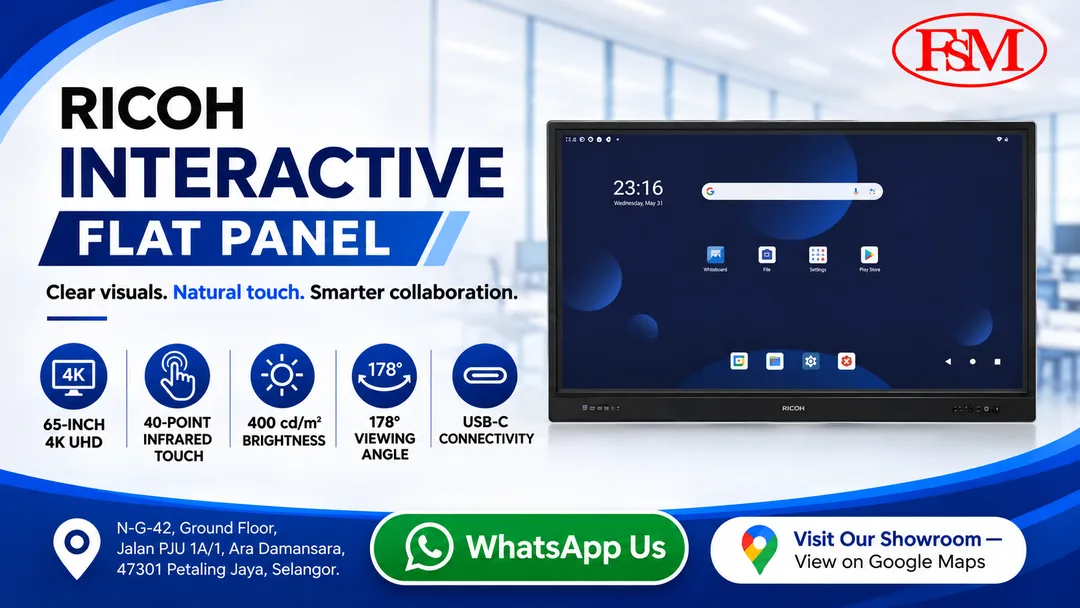
Bring big ideas to life and keep everyone engaged with the Ricoh Interactive Whiteboard A6510. Its generous 65-inch touchscreen and bright 400 cd/m² display deliver crystal-clear visuals that stand out even in well-lit spaces. Powered by Google EDLA certification and an intuitive, smartphone-style interface, it allows teams and educators to jump straight into live annotation, wireless sharing, and seamless collaboration from the moment they walk in.
| What's included |
|
|---|
| Physical dimensions (WxDxH)—mainframe | 1,512.9 x 92.5 x 952.8 mm |
|---|---|
| Weight—mainframe | 39 kg |
| Panel size | 65 inches |
|---|---|
| Backlight | Direct LED |
| Effective display area | 1,428 x 803 mm |
| Resolution | 3,840 x 2,160 pixels (4K) |
| Colour reproduction | 1.07 billion |
| Brightness | 400 cd/m2 |
| Aspect ratio | 16:9 |
| Contrast | 5500:1—typical |
| Pixel pitch | 0.14325 mm (H) x 0.14325 mm (V) |
| Response speed | 6.5 ms—typical |
| Viewing angle HV | 178 degrees |
| Touch technology | Infrared touch frame, zero bonding |
|---|---|
| Touch points | 40—maximum |
| Touch resolution | 32,768 x 32,768—interpolated |
| Touch output | USB 2.0 |
| Touch panel cover glass | 3.2 mm ± 0.2 mm |
| Interfaces - standard |
|
|---|
| Windows | Windows 11, 10 |
|---|---|
| Macintosh | 10.14 or later |
| Power source | 220–240 V, 50 Hz | ||||||
|---|---|---|---|---|---|---|---|
| Power consumption |
380 W—maximum 200 W or less—typical, without OPS 133 W or less—Eco Mode, without OPS 0.5 W or less—standby 2 W or less—wake on LAN 0.3 W or less—Off Mode |
||||||
| Environmental standards |
REACH ErP Lot 5 EU battery (2006/66/EC) EU packaging (94/62/EC) WEEE RoHS EN63000 (CE marking) |
||||||
| Safety standards |
EN62368-1 (CE marking) EN62368-1 (TUV) IEC60950-1 / IEC62368-1 (CB attestation) CNS15598-1 / CNS15936 (RPC) |
||||||
| Electromagnetic Compatibility (EMC) standards |
EN55035, EN55032, EN61000-3-2, EN61000-3-3 (CE marking) AS / NZS CISPR32 (C-Tick) (Australia / NZ) |
||||||
| Wireless LAN standards |
EN300328 / EN301893 (CE marking) EN301489-1 / EN301489-17 (CE marking) EN300328 / EN301893 (RCM) (Australia / NZ) EN301489-1 / EN301489-17 (RCM) (Australia / NZ) NCC |
||||||
| Operating environment |
|
| Service and Maintenance contract | Per year, for RICOH IWB A6510 (65", Pine-D2a). On-site service, labour and parts. |
|---|---|
| Warranty | 1 year term |
Your trusted partner for the RICOH Interactive Whiteboard A6510, from consultation and installation to service after the sale.
A local team you can contact easily for advice, quotations and questions before and after you buy.
We help you choose between the 65", 75" and 86" models to match your room and your team.
Professional installation and setup so your whiteboard is ready to use from day one.
Yearly service and maintenance contract with on-site service, labour and parts.
Peace of mind with a 1 year warranty term on your RICOH IWB.
Guidance on getting the most from your whiteboard, with support whenever you need help.
| Feature | A6510 (65") | A7510 (75") | A8610 (86") |
|---|---|---|---|
| Panel size | 65 inches | 75 inches | 86 inches |
| Resolution | 3,840 x 2,160 pixels (4K) | 3,840 x 2,160 pixels (4K) | 3,840 x 2,160 pixels (4K) |
| Effective display area | 1,428 x 803 mm | 1,650 x 928 mm | 1,895 x 1,065 mm |
| Physical dimensions (WxDxH) | 1,512.9 x 92.5 x 952.8 mm | 1,735.1 x 92.4 x 1,077.3 mm | 1,981 x 92.2 x 1,217 mm |
| Weight | 39 kg | 52 kg | 65 kg |
| Brightness | 400 cd/m2 | 400 cd/m2 | 400 cd/m2 |
| Contrast | 5000:1—typical | 5500:1—typical | 4000:1—typical |
| Response speed | 6.5 ms—typical | 6.5 ms—typical | 8.0 ms—typical |
| Touch points | 40—maximum | 40—maximum | 40—maximum |
| Power consumption | 380 W—maximum 200 W or less—typical 133 W or less—Eco Mode | 420 W—maximum 200 W or less—typical 150 W or less—Eco Mode | 520 W—maximum 200 W or less—typical 168 W or less—Eco Mode |
Related Products & Services: